
butterfly配置指南
配置文件速读
你可以快速瞭解到所有配置的注解,让你配置文件更加方便。
如果遇到不太清楚的配置,可以在这篇文章找到更加详细的资讯。
语言
修改 Hexo 的配置文件 _config.yml
默认语言是 en
主题支持
- default(en)
- zh-CN (简体中文)
- zh-TW (台湾繁体中文)
- zh-HK (香港繁体中文)
- ja (日语)
- ko (韩语)
网站资料
修改网站各种资料,例如标题、副标题和邮箱等个人资料,请修改 Hexo 的_config.yml

导航
参数设置
1 | nav: |
| 参数 | 解释 |
|---|---|
| logo | 网站的 logo,支持图片,直接填入图片链接 |
| display_title | 是否显示网站标题,填写 true 或者 false |
| display_post_title | 是否在滚动时显示文章标题,填写 true 或者 false |
| fixed | 是否固定状态栏,填写 true 或者 false |
目录
1 | Home: / || fas fa-home |
必须是 /xxx/,后面||分开,然后写图标名。
如果不希望显示图标,图标名可不写。
默认子目录是展开的,如果你想要隐藏,在子目录裡添加 hide 。
1 | List||fas fa-list||hide: |
注意: 导航的文字可自行更改
例如:
1 | menu: |

代码块
代码块中的所有功能只适用于 Hexo 自带的代码渲染
如果使用第三方的渲染器,不一定会有效
1 | code_blocks: |
| 参数 | 解释 |
|---|---|
| theme | 代码高亮主题,可选 darker / pale night / light / ocean / false |
| macStyle | 是否使用 Mac 风格 |
| height_limit | 代码块高度限制(单位: px), 可填写 数字 或者 false |
| word_wrap | 是否自动换行 |
| copy | 是否显示复制按钮 |
| language | 是否显示语言标签 |
| shrink | true: 收缩代码块 / false: 展开代码块 / none: 展开代码块并隐藏按钮 |
| fullpage | 是否全屏显示代码块 |
代码高亮主题
Butterfly 支持 6 种代码高亮样式:
- darker
- pale night
- light
- ocean
如果你需要 MacOS 风格的代码高亮样式,可以把macStyle 设为 true。


代码框展开/关闭
在默认情况下,代码框自动展开,可设置是否所有代码框都关闭状态,点击>可展开代码
- true 全部代码框不展开,需点击
>打开 - false 代码框展开,有
>点击按钮 - none 不显示
>按钮
1 | highlight_shrink: true |
你也可以在 post/page 页对应的 markdown 文件 front-matter 添加 highlight_shrink 来独立配置。
当主题配置文件中的 highlight_shrink 设为 true 时,可在 front-matter 添加highlight_shrink: false来单独配置文章展开代码框。
当主题配置文件中的 highlight_shrink 设为 false 时,可在 front-matter 添加highlight_shrink: true来单独配置文章收缩代码框。
highlight_shrink: true

highlight_shrink: false

highlight_shrink: none

代码换行
在默认情况下,Hexo 在编译的时候不会实现代码自动换行。如果你不希望在代码块的区域裡有横向滚动条的话,那么你可以考虑开启这个功能。
1 | code_word_wrap: true |
如果你是使用 highlight 渲染,需要找到你站点的 Hexo 配置文件_config.yml,将line_number改成false:
1 | highlight: |
如果你是使用 prismjs 渲染,需要找到你站点的 Hexo 配置文件_config.yml,将line_number改成false:
1 | prismjs: |


代码高度限制
可配置代码高度限制,超出的部分会隐藏,并显示展开按钮。
1 | highlight_height_limit: false |
注意:
单位是
px,直接添加数字,如 200实际限制高度为
highlight_height_limit + 30 px,多增加 30px 限制,目的是避免代码高度只超出 highlight_height_limit 一点时,出现展开按钮,展开没内容。不适用于隐藏后的代码块( css 设置 display: none)

社交图标
Butterfly 支持 font-awesome v6 图标.
书写格式 图标名:url || 描述性文字 || color
1 | social: |
图标名可在这寻找

PC:
Mobile:

图片设置
头像
1 | avatar: |

顶部图
如果不要显示顶部图,可直接配置 disable_top_img: true
顶部图的获取顺序,如果都没有配置,则不显示顶部图。
页面顶部图的获取顺序:
各自配置的 top_img>配置文件的 default_top_img文章页顶部图的获取顺序:
各自配置的 top_img>cover>配置文件的 default_top_img
配置中的值:
| 配置 | 解释 |
|---|---|
| index_img | 主页的 top_img |
| default_top_img | 默认的 top_img,当页面的 top_img 没有配置时,会显示 default_top_img |
| archive_img | 归档页面的 top_img |
| tag_img | tag 子页面 的 默认 top_img |
| tag_per_img | tag 子页面的 top_img,可配置每个 tag 的 top_img |
| category_img | category 子页面 的 默认 top_img |
| category_per_img | category 子页面的 top_img,可配置每个 category 的 top_img |
其它页面 (tags/categories/自建页面)和 文章页 的 top_img ,请到对应的 md 页面设置front-matter中的top_img
以上所有的 top_img 可配置以下值
| 配置的值 | 效果 |
|---|---|
| 留空 | 显示默认的 top_img(如有),否则显示默认的顔色 |
| (文章页 top_img 留空的话,会显示 cover 的值) | |
| img 链接 | 图片的链接,显示所配置的图片 |
| 顔色( | |
| HEX 值 - #0000FF | |
| RGB 值 - rgb(0,0,255) | |
| 顔色单词 - orange | |
| 渐变色 - linear-gradient( 135deg, #E2B0FF 10%, #9F44D3 100%) | |
| ) | 对应的顔色 |
| transparent | 透明 |
| false | 不显示 top_img |
tag_per_img 和 category_per_img 是 3.2.0 新增的内容,可对 tag 和 category 进行单独的配置
并不推荐为每个 tag 和每个 category 都配置不同的顶部图,因为配置太多会拖慢生成速度
1 | tag_per_img: |


top_img: ‘linear-gradient(20deg, #0062be, #925696, #cc426e, #fb0347)’

页脚背景图
1 |
|
| 配置的值 | 效果 |
|---|---|
| 留空/false | 显示默认的顔色 |
| img 链接 | 图片的链接,显示所配置的图片 |
| 顔色( | |
| HEX 值 - #0000FF | |
| RGB 值 - rgb(0,0,255) | |
| 顔色单词 - orange | |
| 渐变色 - linear-gradient( 135deg, #E2B0FF 10%, #9F44D3 100%) | |
| ) | 对应的顔色 |
| transparent | 透明 |
| true | 显示跟 top_img 一样 |

网站背景
默认显示白色,可设置图片或者颜色
1 |
|
留意: 如果你的网站根目录不是’/‘,使用本地图片时,需加上你的根目录。
例如:网站是 https://yoursite.com/blog,引用一张img/xx.png图片,则设置 background 为 /blog/img/xx.png


文章封面
文章的 markdown 文档上,在 Front-matter 添加 cover ,并填上要显示的图片地址。
如果不配置 cover,可以设置显示默认的 cover。
如果不想在首页显示 cover, 可以设置为 false。
文章封面的获取顺序 Front-matter 的 cover > 配置文件的 default_cover > false
1 | cover: |
| 参数 | 解释 |
|---|---|
| index_enable | 主页是否显示文章封面图 |
| aside_enable | 侧栏是否显示文章封面图 |
| archives_enable | 归档页面是否显示文章封面图 |
| default_cover | 默认的 cover, 可配置图片链接/顔色/渐变色等 |
当配置多张图片时,会随机选择一张作为 cover.此时写法应为
1 | default_cover: |


这个选项是用来显示文章的相关信息的。
1 | post_meta: |
主页:
| 参数 | 解释 |
|---|---|
| date_type | 显示文章的时间,可选 created / updated / both |
| date_format | 配置时间显示明确时间还是相对时间,可选 date / relative |
| categories | 是否显示文章的分类 |
| tags | 是否显示文章的标签 |
| label | 是否显示文字标签 |
文章页:
| 参数 | 解释 |
|---|---|
| position | 文章页 meta 显示的位置,可选 left / center |
| date_type | 显示文章的时间,可选 created / updated / both |
| date_format | 配置时间显示明确时间还是相对时间,可选 date / relative |
| categories | 是否显示文章的分类 |
| tags | 是否显示文章的标签 |
| label | 是否显示文字标签 |

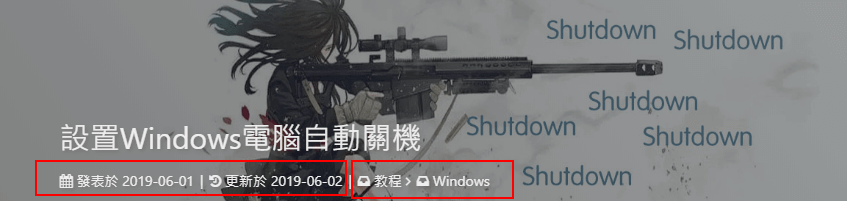

date_format 是 3.2.0 新增的内容,配置时间显示明确时间还是相对时间


首页
首页顶部图大小
默认的显示为全屏,网站信息会居中显示
1 |
|
注意:index_top_img_height的值不能使用百分比。
2 个都不填的话,会使用默认值
举例,当
1 | index_top_img_height: 400px |
效果

网站副标题
可设置主页中显示的网站副标题或者喜欢的座右铭。
1 |
|

首页卡片佈局
主题文章卡片支持 7 种佈局
1 | index_layout: 3 |
配置解释:
| 配置值 | 解释 |
|---|---|
| 1 | 封面在左,信息在右 |
| 2 | 封面在右,信息在左 |
| 3 | 封面和信息左右交替显示 |
| 4 | 封面在上,信息在下 |
| 5 | 信息显示在封面上 |
| 6 | 瀑布流佈局 - 封面在上,信息在下 |
| 7 | 瀑布流佈局 - 信息显示在封面上 |
填写数字序号即可,默认为 3

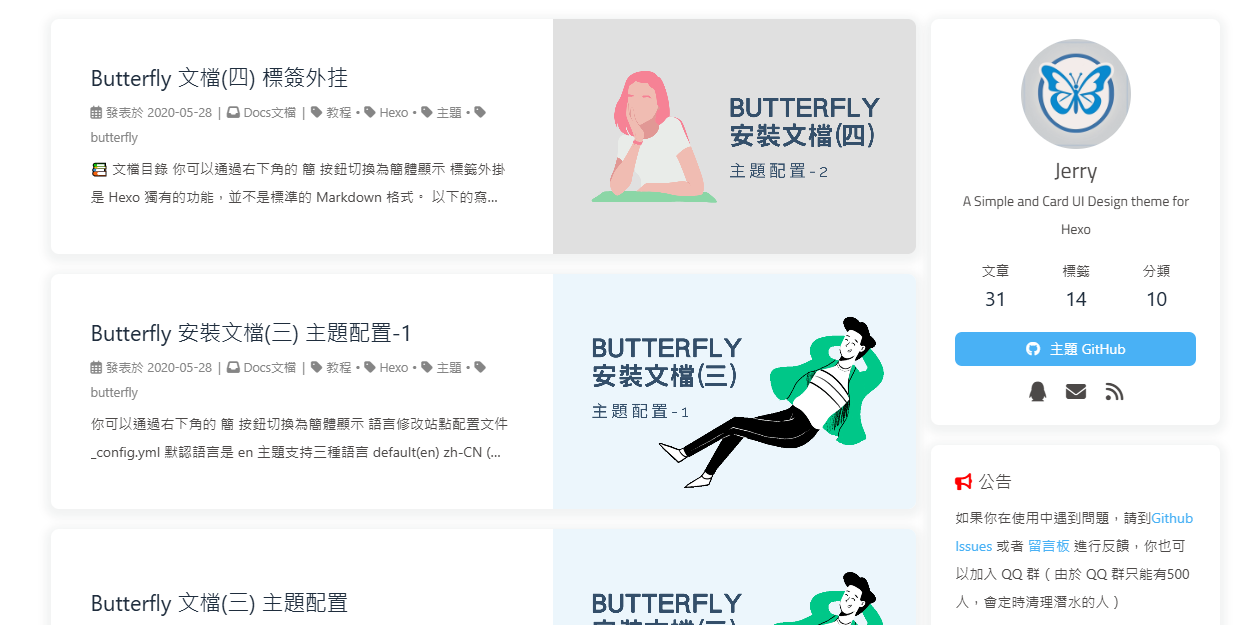

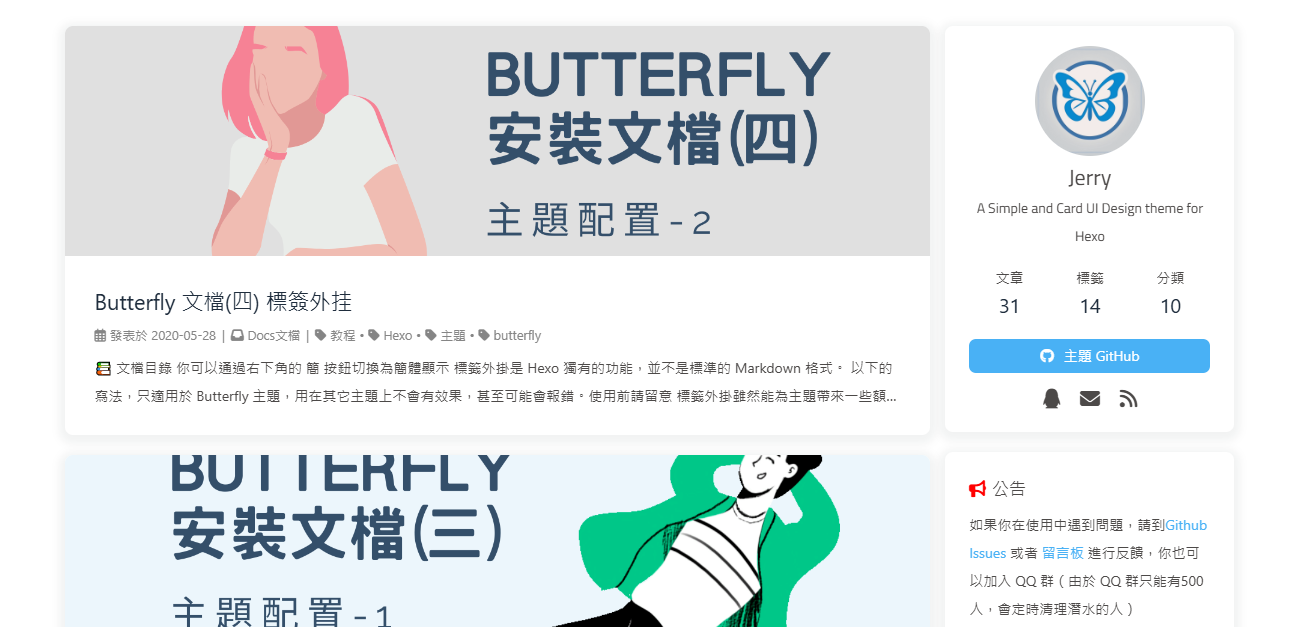


主页文章节选
因为主题 UI 的关係,主页文章节选只支持自动节选和文章页description。
1 |
|
| 参数 | 解释 |
|---|---|
| method | 显示文章内容的方式,有四种可供选择 |
| 1 - 只显示 description | |
| 2 - 优先选择 description,如果没有配置 description,则显示自动节选的内容 | |
| 3 - 只显示自动节选 | |
| 4 - 不显示文章内容 | |
| length | 自动节选的长度,只有在 method 为 2 或者 3 的时候才需要配置 length |
description在 front-matter 裡添加
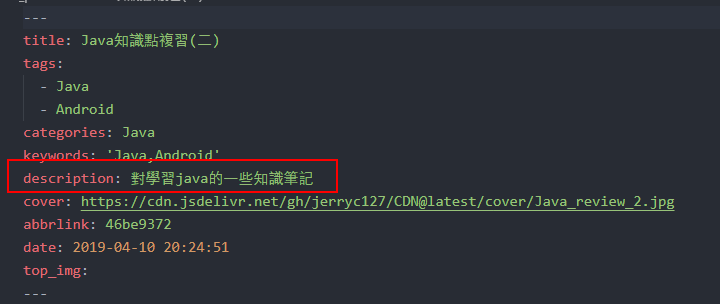
文章页
TOC 目录
在侧边栏显示 TOC(文章目录)
1 | toc: |
| 属性 | 解释 |
|---|---|
| post | 文章页是否显示 TOC |
| page | 普通页面是否显示 TOC |
| number | 是否显示章节数 |
| expand | 是否展开 TOC |
| style_simple | 简洁模式(侧边栏只显示 TOC, 只对文章页有效 ) |
| scroll_percent | 是否显示滚动进度百分比 |


为特定的文章配置
在你的文章md文件的头部,加入toc_number和toc,并配置true或者false即可。
主题会优先判断文章 Markdown 的 Front-matter 是否有配置,如有,则以 Front-matter 的配置为准。否则,以主题配置文件中的配置为准。
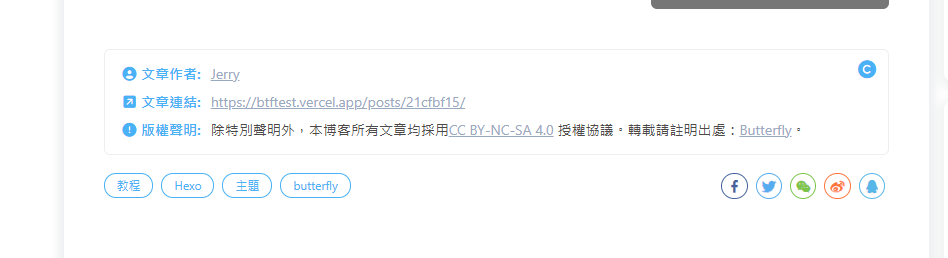
文章版权
为你的博客文章展示文章版权和许可协议。
1 | post_copyright: |
由于Hexo 4.1开始,默认对网址进行解码,以至于如果是中文网址,会被解码,可设置decode: true来显示中文网址。
如果有文章(例如:转载文章)不需要显示版权,可以在文章 Front-matter 单独设置
1 | copyright: false |
从3.0.0开始,支持对单独文章设置版权信息,可以在文章 Front-matter 单独设置
1 | copyright_author: xxxx |
版权显示截图
文章打赏/贊助
在你每篇文章的结尾,可以添加贊助按钮。相关二维码可以自行配置。
对于没有提供二维码的,可配置一张软件的 icon 图片,然后在 link 上添加相应的贊助链接。用户点击图片就会跳转到链接去。
link 可以不写,会默认为图片的链接。
1 | reward: |

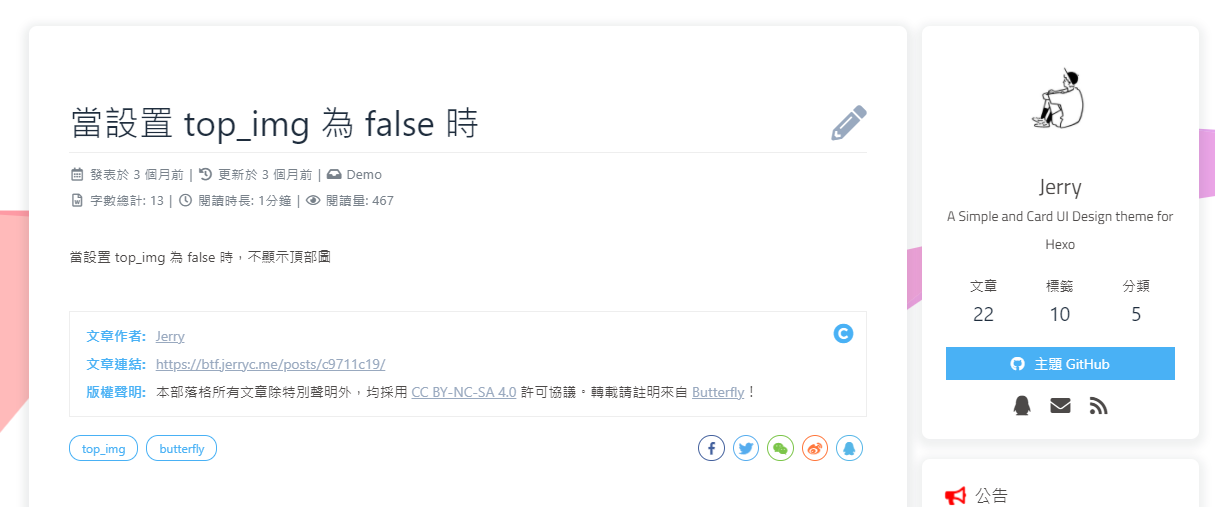
文章编辑按钮
在文章标题旁边显示一个编辑按钮,点击会跳转到对应的链接去。
1 |
|

相关文章
当文章封面设置为 false 时,或者没有获取到封面配置,相关文章背景将会显示主题色。
相关文章推荐的原理是根据文章 tags 的比重来推荐
1 | related_post: |

文章分页按钮
当文章封面设置为 false 时,或者没有获取到封面配置,分页背景将会显示主题色。
可设置分页的逻辑,也可以关闭分页显示
1 |
|
| 参数 | 解释 |
|---|---|
| post_pagination: false | 关闭分页按钮 |
| post_pagination: 1 | 下一篇显示的是旧文章 |
| post_pagination: 2 | 下一篇显示的是新文章 |

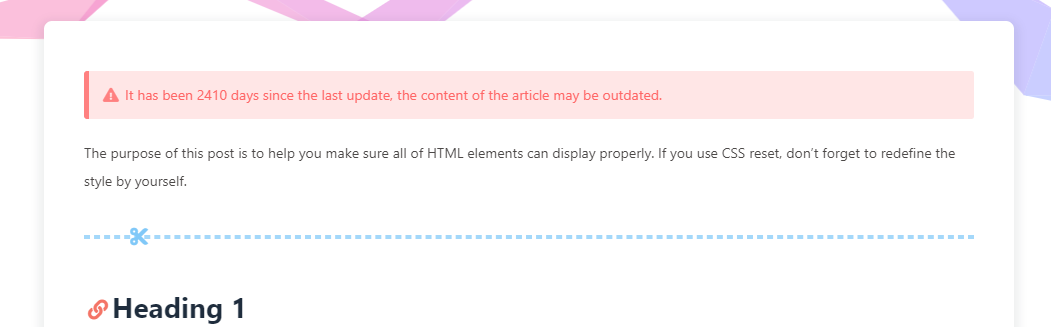
文章过期提醒
如果你想单独关闭某些文章的过期提醒,你可以在对应文章页的 front-matter 中配置 noticeOutdate: false 来关闭。
可设置是否显示文章过期提醒,以更新时间为基准。
1 |
|
| 配置 | 解释 |
|---|---|
| enable | 是否开启文章过期提醒 |
| style | 提醒样式, simple / flat |
| limit_day | 设置多少天后提醒,默认 365 天 |
| position | 提醒位置 top / bottom |
| message_prev | 提示文字 |
| message_next | 提示文字 |

页脚
页脚导航栏
页脚导航栏可以配置为显示在页脚的顶部,或者不显示。
你可以配置或者留空
留空则显示旧版页脚
以下是示例:
1 | nav: |
配置解释
| 配置 | 解释 |
|---|---|
| width | 设置宽度,建议不配置(可不写) |
| content | 页脚导航栏的内容,支持多个内容,每个内容可以有多个项目 |
| title | 页脚导航栏的标题 |
| item | 页脚导航栏的项目,支持多个项目,每个项目可以有标题和链接 |
| title | 页脚导航栏项目的标题 |
| url | 页脚导航栏项目的链接 |
| html | 页脚导航栏项目的 HTML 内容,支持图片等其他内容 |
博客年份
since是一个来展示你站点起始时间的选项。它位于页面的最底部。
1 | footer: |

页脚自定义文本
custom_text是一个给你用来在页脚自定义文本的选项。通常你可以在这裡写声明文本等,支持 HTML。
1 | custom_text: Hi, welcome to my <a href="https://butterfly.js.org/">blog</a>! |

对于部分人需要写 ICP 的,也可以写在 custom_text裡
1 | custom_text: <a href="icp链接"><img class="icp-icon" src="icp图片"><span>备案号:xxxxxx</span></a> |
Aside
配置
侧边栏的配置
1 | aside: |
sort_order 是给每个卡片配置的排序,如果不配置,则按照主题配置文件的排序。数字越小,越靠前。
| 配置 | 解释 |
|---|---|
| enable | 是否启用侧边栏 |
| hide | 是否默认隐藏侧边栏 |
| button | 是否显示隐藏侧边栏的按钮 |
| mobile | 是否在移动端显示侧边栏 |
| position | 侧边栏位置,left / right |
| display.archive | archive 页面是否显示 aside |
| display.tag | tag 页面是否显示 aside |
| display.category | category 页面是否显示 aside |
| card_author.enable | 是否显示作者卡片 |
| card_author.description | 作者描述信息 |
| card_author.button.enable | 是否显示按钮 |
| card_author.button.icon | 按钮图标,可在这裡找到图标名称:https://fontawesome.com/icons?d=gallery&m=free |
| card_author.button.text | 按钮文字 |
| card_author.button.link | 按钮链接 |
| card_announcement.enable | 是否显示公告卡片 |
| card_announcement.content | 公告内容 (可使用 html 标签) |
| card_recent_post.enable | 是否显示最新文章卡片 |
| card_recent_post.limit | 显示文章数目,0 为全部 |
| card_recent_post.sort | 排序方式,date / updated |
| card_newest_comments.enable | 是否显示最新评论卡片 |
| card_newest_comments.limit | 显示评论数目,0 为全部 |
| card_newest_comments.storage | 保存时间,单位分钟,保存到本地存储,避免每次刷新都重新请求数据 |
| card_newest_comments.avatar | 是否显示头像 |
| card_categories.enable | 是否显示分类卡片 |
| card_categories.limit | 显示分类数目,0 为全部 |
| card_categories.expand | 是否展开分类,none / true / false |
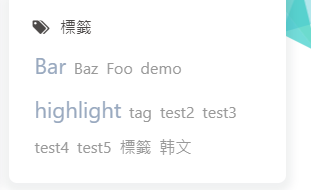
| card_tags.enable | 是否显示标签卡片 |
| card_tags.limit | 显示标签数目,0 为全部 |
| card_tags.color | 是否显示标签顔色 |
| card_tags.orderby | 标签排序方式,random / name / length |
| card_tags.order | 排序方式,1 为升序,-1 为降序 |
| card_archives.enable | 是否显示归档卡片 |
| card_archives.type | 归档类型,monthly / yearly |
| card_archives.format | 归档显示格式,例如:YYYY 年 MM 月 |
| card_archives.order | 排序方式,1 为升序,-1 为降序 |
| card_archives.limit | 显示归档数目,0 为全部 |
| card_post_series.enable | 是否显示文章系列卡片 |
| card_post_series.series_title | 是否显示系列名称 |
| card_post_series.orderBy | 排序方式,title / date |
| card_post_series.order | 排序方式,1 为升序,-1 为降序 |
| card_webinfo.enable | 是否显示网站信息卡片 |
| card_webinfo.post_count | 是否显示文章数量 |
| card_webinfo.last_push_date | 是否显示最后更新日期 |
| card_webinfo.runtime_date | 显示网站运行时间,不需要开启,留空白就行(开启格式一定要是 Month/Day/Year Time 或者 Year/Month/Day Time |
目前有三个评论 Livere、Facebook Comments 和 Giscus 不支持最新评论。
最新评论只会在刷新时才会去读取,并不会实时变化
由于 API 有 访问次数限制,为了避免调用太多,主题默认存取期限为 10 分钟。也就是説,调用后资料会存在 localStorage 裡,10 分钟内刷新网站只会去 localStorage 读取资料。 10 分钟期限一过,刷新页面时才会去调取 API 读取新的数据。( 3.6.0 新增了 storage 配置,可自行配置缓存时间)


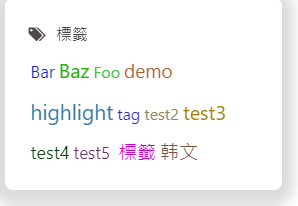


自定义添加栏目
右下角按钮
按钮位置
当开启 chat 聊天服务后,聊天服务的按钮可能会遮挡到右下角的按钮,可以设置按钮的位置。
非必要不建议设置,默认就行
1 |
|
默认单位为 px,直接添加数字即可。
简繁转换
主题内置了一个简单的简繁转换功能,採用一对一的形式配对。遇到一字多繁或者一字多简的情况下,会出现不能正常转换正确的简繁体,请留意。
开启后,右下角会有简繁转换按钮。
1 | translate: |
閲读模式
閲读模式下会去掉除文章外的内容,避免干扰閲读。
只会出现在文章页面,右下角会有閲读模式按钮。
1 | readmode: true |

夜间模式
右下角会有夜间模式按钮
1 |
|
| 参数 | 解释 |
|---|---|
| button | 是否在右下角显示日夜模式切换按钮 |
| autoChangeMode | 自动切换的模式 |
| autoChangeMode: 1 跟随系统而变化,不支持的浏览器/系统将按照时间 start 到 end 之间切换为 light mode | |
| autoChangeMode: 2 只按照时间 start 到 end 之间切换为 light mode ,其余时间为 dark mode | |
| autoChangeMode: false 取消自动切换 | |
| start | light mode 的开始时间 |
| end | light mode 的结束时间 |

滚动状态百分比
1 |
|

按钮排序
可对右下角按钮进行排序
注意: 不要重复
1 |
|
全局配置
页面锚点
开启页面锚点后,当你在进行滚动时,页面链接会根据标题 ID 进行替换
(注意: 每替换一次,会留下一个历史记录。所以如果一篇文章有很多锚点的话,网页的历史记录会很多。)
1 |
|
| 配置 | 解释 |
|---|---|
| auto_update | 当滚动时,URL 将根据标题 id 更新。默认为 false。 |
| click_to_scroll | 点击标题滚动并更新锚点。默认为 false。 |
图片描述
可开启图片 Figcaption 描述文字显示
优先显示图片的 title 属性,然后是 alt 属性
1 | photofigcaption: true |

复制相关配置
可配置网站是否可以复制、复制的内容是否添加版权信息
1 | copy: |
| 配置 | 解释 |
|---|---|
| enable | 是否开启网站复制权限 |
| copyright | 复制的内容后面加上版权信息 |
| enable | 是否开启复制版权信息添加 |
| limit_count | 字数限制,当复制文字大于这个字数限制时,将在复制的内容后面加上版权信息 |
1 | Lorem ipsum dolor sit amet, test link consectetur adipiscing elit. Strong text pellentesque ligula commodo viverra vehicula. Italic text at ullamcorper enim. Morbi a euismod nibh. Underline text non elit nisl. Deleted text tristique, sem id condimentum tempus, metus lectus venenatis mauris, sit amet semper lorem felis a eros. Fusce egestas nibh at sagittis auctor. Sed ultricies ac arcu quis molestie. Donec dapibus nunc in nibh egestas, vitae volutpat sem iaculis. Curabitur sem tellus, elementum nec quam id, fermentum laoreet mi. Ut mollis ullamcorper turpis, vitae facilisis velit ultricies sit amet. Etiam laoreet dui odio, id tempus justo tincidunt id. Phasellus scelerisque nunc sed nunc ultricies accumsan. |
字数统计
开启字数统计功能,需要安装hexo-wordcount插件
在 hexo 工作目录下运行 npm install hexo-wordcount --save or yarn add hexo-wordcount
1 |
|
| 参数 | 解释 |
|---|---|
| post_wordcount | 在文章页面显示字数 |
| min2read | 在文章页面显示閲读时间 |
| total_wordcount | 在侧边栏显示网站总字数 |


访问人数 busuanzi (UV 和 PV)
深入瞭解 安裝 安裝程式 軟體 軟件 外掛程式 外掛 plugin Plugin plugins 使用者介面
访问 busuanzi 的官方网站查看更多的介绍。
由于 busuanzi 的稳定性问题,偶尔会遇到无法访问的情况,请留意。
文章页的访问人数统计,是通过 busuanzi 这个插件实现的。个别评论系统自带访问人数统计功能,可以在相对应的评论系统配置中进行开启,其会代替 busuanzi 的统计。
1 | busuanzi: |
如果需要修改 busuanzi 的 CDN 链接,可通过 主题配置文件 的 CDN 中的 option 进行修改
1 | CDN: |


Math 数学
主题支持两种数学公式渲染引擎,MathJax 和 KaTeX。你可以根据自己的需求选择一种。
1 |
|
| 参数 | 解释 |
|---|---|
| use | 选择数学公式渲染引擎,选择 mathjax 或 katex,如果不需要数学公式,请留空 |
| per_page | 是否每一页都加载数学公式渲染引擎,如果设置为 false,则需要在文章的 Front-matter 添加 mathjax: true 或 katex: true,对应的文章才会加载数学公式渲染引擎 |
| hide_scrollbar | 是否隐藏滚动条 |
搜索
主题支持三种搜索方式(algolia_search / local_search / docsearch),你可以选择一种或者多种搜索方式。
1 | search: |
| 参数 | 解释 |
|---|---|
| use | 选择你需要的搜索方式,不需要开启留空白 |
| placeholder | 搜索框的提示文字 |
分享
只能选择一个分享服务商
主题支持两种分享方式,一种是sharejs,一种是addtoany。
1 | share: |
| 参数 | 解释 |
|---|---|
| use | 选择分享方式,可选sharejs或addtoany,如果不需要分享请留空 |
评论
主题支持多种评论系统,你可以根据自己的喜好选择一种。
你也可以选择双评论,只需要配置两个评论(第一个为默认显示)
1 | comments: |
| 参数 | 解释 |
|---|---|
| use | 使用的评论(请注意,最多支持两个,如果不需要请留空) |
| 注意:双评论不能是 Disqus 和 Disqusjs 一起,由于其共用同一个 ID,会出错 | |
| text | 是否显示评论服务商的名字 |
| lazyload | 是否为评论开启 lazyload,开启后,只有滚动到评论位置时才会加载评论所需要的资源(开启 lazyload 后,评论数将不显示) |
| count | 是否在文章顶部显示评论数 |
| livere、Giscus 和 utterances 不支持评论数显示 | |
| card_post_count | 是否在首页文章卡片显示评论数 |
| gitalk、livere 、Giscus 和 utterances 不支持评论数显示 |


在綫聊天
主题内置了多种在綫聊天工具。你可以选择开启一种,方便你与访客的交流。
1 | chat: |
| 参数 | 解释 |
|---|---|
| use | 选择你要使用的聊天工具,可选择chatra/tidio/crisp |
| rightside_button | 是否开启右下角聊天按钮 |
| button_hide_show | 是否开启滚动时隐藏聊天按钮 |
这些工具都提供了一个按钮可以打开/关闭聊天窗口。
主题也提供了一个集合主题特色的按钮来替换这些工具本身的按钮,这个聊天按钮将会出现在右下角裡。
你只需要把rightside_button打开就行。
深入瞭解 外掛程式 Plugin plugin 軟體 安裝程式 安裝 plugins 外掛 軟件 UI

为了不影响访客的体验,主题提供一个button_hide_show配置
设为true后,使用工具提供的按钮时,只有向上滚动才会显示聊天按钮,向下滚动时会隐藏按钮。
分析统计
登录百度统计的官方网站
找到你百度统计的统计代码

- 修改
主题配置文件
1 | baidu_analytics: 你的代码 |
广告
主题已集成谷歌广告(自动广告)
1 | google_adsense: |

网站验证
深入瞭解 軟體 外掛 安裝 Plugin 安裝程式 plugins 軟件 外掛程式 plugin 使用者介面
如果需要搜索引擎收录网站,可能需要登录对应搜索引擎的管理平台进行提交。
各自的验证码可从各自管理平台拿到
1 | site_verification: |
美化/特效
自定义主题色
深入瞭解 外掛 軟件 安裝 外掛程式 plugins Plugin 安裝程式 plugin 軟體 函式庫
可以修改大部分 UI 颜色
修改 主题配置文件,比如:
颜色值必须被双引号包裹,就像"#000"而不是#000。否则将会在构建的时候报错!
1 | theme_color: |
| 参数 | 解释 |
|---|---|
| main | 主题色 |
| paginator | 分页器颜色 |
| button_hover | 按钮 hover 颜色 |
| text_selection | 文字选中颜色 |
| link_color | 链接颜色 |
| meta_color | 文章元数据颜色 |
| hr_color | 分割线颜色 |
| code_foreground | 代码前景色 |
| code_background | 代码背景色 |
| toc_color | 目录颜色 |
| blockquote_padding_color | 引用边框颜色 |
| blockquote_background_color | 引用背景色 |
| scrollbar_color | 滚动条颜色 |
| meta_theme_color_light | light mode 主题色 |
| meta_theme_color_dark | dark mode 主题色 |


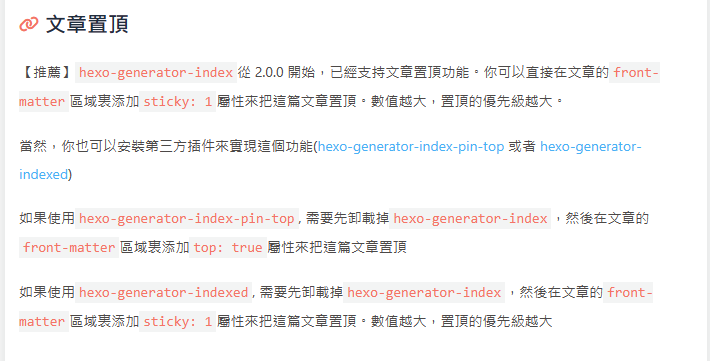
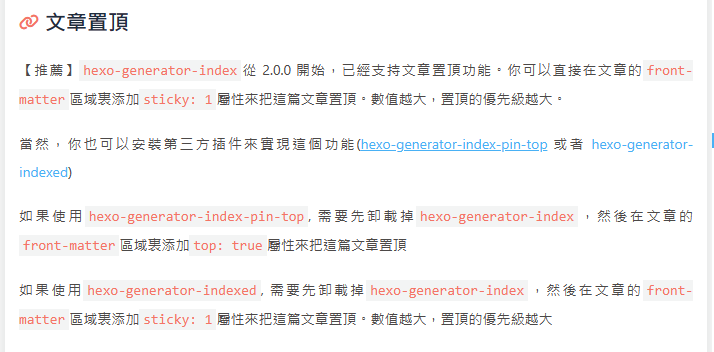
文字左右对齊
深入瞭解 plugin 外掛 plugins 安裝程式 軟件 軟體 Plugin 外掛程式 安裝 外挂
可设置文字向两侧对齊,对最后一行无效
1 |
|
text_align_justify: false
黑色遮罩
深入瞭解 軟體 外掛程式 Plugin 安裝 安裝程式 plugins 外掛 plugin 軟件 函式庫
为了避免图片过于鲜艷而导致文字无法閲读,默认为顶部图和页脚添加黑色遮罩
1 |
|
页面加载动画 preloader
当进入网页时,因为加载速度的问题,可能会导致 top_img 图片出现断层显示,或者网页加载不全而出现等待时间,开启 preloader 后,会显示加载动画,等页面加载完,加载动画会消失。
深入瞭解 軟件 外掛程式 plugins 安裝程式 外掛 安裝 Plugin 軟體 plugin 使用者介面
主题支持 pace.js 的加载动画,具体可查看 pace.js
配置 butterly.yml
1 |
|

页面美化
深入瞭解 軟件 安裝 plugin 軟體 安裝程式 外掛程式 外掛 Plugin plugins UI
会改变 ol、ul、h1-h5 的样式
field配置生效的区域
post只在文章页生效site在全站生效
1 |
|
| 参数 | 解释 |
|---|---|
| enable | 是否开启美化 |
| field | 美化的区域 |
| title-prefix-icon | 标题前缀的 icon |
| title-prefix-icon-color | 标题前缀的 icon 的颜色 |
title-prefix-icon填写的是fontawesome的icon的Unicode数。


自定义字体和字体大小
全局字体
可自行设置字体的font-family
深入瞭解 軟體 安裝 安裝程式 外掛程式 軟件 plugin Plugin 外掛 plugins 外挂
如不需要配置,请留空
1 |
|
| 参数 | 解释 |
|---|---|
| global-font-size | 全局字体大小 |
| code-font-size | 代码字体大小 |
| font-family | 全局字体 |
| code-font-family | 代码字体 |
Blog 标题字体
可自行设置字体的font-family
如不需要配置,请留空。
如不需要使用网络字体,只需要把 font_link 留空就行
1 |
|
| 参数 | 解释 |
|---|---|
| font_link | 网络字体的连结 |
| font-family | 网站标题字体 |
打字效果
1 |
|
| 参数 | 解释 |
|---|---|
| enable | 是否开启打字效果 |
| colorful | 是否开启冒光特效 |
| shake | 是否开启抖动特效 |
| mobile | 是否在移动端开启打字效果 |

背景特效
好看的綵带背景,可设置每次刷新更换綵带,或者每次点击更换綵带
1 | canvas_ribbon: |
| 参数 | 解释 |
|---|---|
| enable | 是否开启綵带特效 |
| size | 綵带的大小 |
| alpha | 綵带的透明度 |
| zIndex | 綵带的层级 |
| click_to_change | 点击更换綵带 |
| mobile | 手机端是否显示綵带 |
相关配置可查看canvas_ribbon

鼠标点击效果
1 | fireworks: |
| 参数 | 解释 |
|---|---|
| enable | 是否开启烟花特效 |
| zIndex | 烟花的层级, -1 代表烟火效果在底部 / |
9999 代表烟火效果在前面 |
|
| mobile | 手机端是否显示烟花 |

图片大图查看模式
如果你并不想为某张图片添加大图查看模式,你可以使用 html 格式引用图片,併为图片添加 no-lightbox class 名
1 |
|
可配置 fancybox 或 medium_zoom 来启用图片大图查看模式
不需要大图查看模式时,请留空


标签外挂
具体可查看 标签外挂
Mermaid
主题支持 Mermaid.js,可以在文章中使用 Mermaid.js 绘制流程图、序列图等。
配置:
1 |
|
书写方法
主题支持两种书写方法
标签外挂
你可以使用标签外挂的方式来使用 Mermaid.js
具体可查看 Mermaid 标签外挂
代码块书写
你可以使用代码块的方式来使用 Mermaid.js
hexo 版本需要 7.0 或以上
hexo 的配置文件 要添加
exclude_languages: ['mermaid']1
2
3
4
5
6
7
8
9
10
11
12
13syntax_highlighter: 'highlight.js'
highlight:
line_number: true
auto_detect: false
tab_replace: ''
wrap: true
hljs: false
exclude_languages: ['mermaid']
prismjs:
preprocess: true
line_number: true
tab_replace: ''
exclude_languages: ['mermaid']butterfly的配置文件中 mermaid 的 code_write 设为 true
例子

Pjax
当用户点击链接,通过 ajax 更新页面需要变化的部分,然后使用 HTML5 的 pushState 修改浏览器的 URL 地址。
这样可以不用重复加载相同的资源(css/js), 从而提升网页的加载速度。
1 | pjax: |
对于一些第三方插件,有些并不支持 pjax 。
你可以把网页加入到 exclude 裡,这个网页会被 pjax 排除在外。
点击该网页会重新加载网站
使用 pjax 后,一些自己 DIY 的 js 可能会无效,跳转页面时需要重新调用,请参考Pjax 文档
使用 pjax 后,一些个别页面加载的 js/css,将会改为所有页面都加载
Snackbar 弹窗
Snackbar 弹窗,根据自己爱好开启
1 |
|


Instantpage
当鼠标悬停到链接上超过 65 毫秒时,Instantpage 会对该链接进行预加载,可以提升访问速度。
修改配置文件
1 |
|
PWA
要为Butterfly配上 PWA 特性, 你需要如下几个步骤:
打开 hexo 工作目录
npm install hexo-offline --save或者yarn add hexo-offline在根目录创建
hexo-offline.config.cjs文件,并增加以下内容。
1 |
|
更多内容请查看 hexo-offline的官方文档
- 在
主题配置文件中开启 pwa 选项。
1 | pwa: |
- 在创建
source/目录中创建manifest.json文件。
1 | { |
你也可以通过 Web App Manifest快速创建manifest.json。(Web App Manifest 要求至少包含一个 512*512 像素的图标)
可以通过
Chrome插件Lighthouse检查 PWA 配置是否生效以及配置是否正确。- 打开博客页面
- 启动
Lighthouse插件 (Lighthouse插件要求至少包含一个 512*512 像素的图标)
关于 PWA(渐进式增强 Web 应用)的更多内容请参閲 Google Tools for Web Developers
Open Graph
在 head 裡增加一些 meta 资料,例如缩略图、标题、时间等等。当你分享网页到一些平台时,平台会读取 Open Graph 的内容,展示缩略图,标题等等信息。
修改配置文件
1 |
|
CSS 前缀
有些 CSS 并不是所有浏览器都支持,需要增加对应的前缀才会生效。
开启 css_prefix 后,会自动为一些 CSS 增加前缀。(会增加 20%的体积)
修改配置文件
1 |
|
Inject
如想添加额外的 js/css/meta 等等东西,可以在 Inject 裡添加,支持添加到 head(</body>标签之前)和 bottom(</html>标签之前)。
请注意:以标准的 html 格式添加内容
例如
1 | inject: |
留意: 如果你的网站根目录不是’/‘,使用本地图片时,需加上你的根目录。
例如:网站是 https://yoursite.com/blog,引用css/xx.css,则设置为<link rel="stylesheet" href="/blog/css/xx.css">
CDN
配置文件中最后一部分 CDN,裡面是主题所引用到的文件,可自行配置 CDN。(非必要请勿修改,配置后请确认链接是否能访问)
1 |
|
| 参数 | 解释 |
|---|---|
| internal_provider | 主题内部文件 |
| 可选 local/jsdelivr/unpkg/cdnjs/custom | |
lcoal 为本地加载,custom 为自定义格式,需配置 custom_format |
|
| 注意: 如果使用的是 Dev 版,只能设置为 local | |
| third_party_provider | 第三方文件 |
| 可选 local/jsdelivr/unpkg/cdnjs/custom | |
lcoal 为本地加载,custom 为自定义格式,需配置 custom_format |
|
注意: 如果你选择 local 需要安装 hexo-butterfly-extjs插件 |
|
| version | true/false 为 cdn 加上指定版本号 |
| custom_format | 自定义格式 |
| option | 你可以在这裡更换部分文件,会覆盖原有的配置 |
version
如需修改版本号,可修改主题目录的 ‘plugins.yml’ 中对应插件的 version
请确保你修改的版本号,你所使用的 cdn 有收录
custom_format
提供以下参数
| 参数 | 解释 |
|---|---|
| name | npm 上的包名 |
| file | npm 上的文件路径 |
| min_file | npm 上的文件路径(压缩过的文件) |
| cdnjs_name | cdnjs 上的包名 |
| cdnjs_file | cdnjs 上的文件路径 |
| min_cdnjs_file | cdnjs 上的文件路径(压缩过的文件) |
| version | 插件版本号 |
部分可用的第三方 CDN 列表
请确保你选择的 CDN 有收录主题使用的第三方插件